
Sample Point Locations
With the Sample Point Location add-on installed, users can capture both the Location, a village or building, and the actual Sample Point there for say water samples
Overview
In some use cases it makes sense to group a number of Sample Points together on their Location, e.g. a number of water Sample Points per village or building complex or lubrication points on a big piece of machinery
Install the Bika add-on senaite.samplepointlocations for this two tier Sample Point addressing to be available
Sample Point Locations* then replaces Sample Points in the UI, and Sample Points are configured 'inside' Locations
Since the Location term is already used for Sample Storage Locations and for Instruments too, the locations here are called Sample Point Locations
Installation
WIth the senaite.samplelocations add-on installed, the Sample Point folder on Clients is replaced by Sample Point Location where the Client's Locations are housed
Press [+Add] to create a new one or click on an existing one to edit it
Configuring Sample Point Locations
Please complete the Sample Point Fields to make it easy for users to identify and describe the Location
Account manager
More often used by Water treatment organisations, a Location can be assigned a location manager from their own staff that is responsible for water quality at there
Select one for the Location if necessary, they have to be set up as lab contacts
Sample Points per Location
In the Sample Point Location, all its Sample Points are listed, press [+Add] to create a new one or click on an existing one to edit it
Completes as many of the fields that are needed for your application. Many of them describe equipment that might be installed at the Sample Point
By specifying the Sample Point's Sample Type, that field will be auto-completed on the sample registration form
Using Sample Point Locations
Configure the Sample registration form to list Sample Point Location, Sample Point in sequence
When a Sample Point Location is selected, the CC email field is completed with Location manager's email address to ensure he/she also gets a copy of the results
The Sample Point lookup will be restricted to those at that Location only
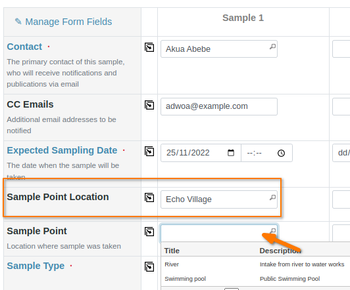
Once the Sample Point is selected, the Sample Type auto-completes with that configured for the Sample Point