
Batch Sub-groups. Book view
Track the evolution and consistency of a product through manufacturing phases and shelf life
Background
Some Production labs find it necessary to monitor a Product through a sequence of steps, e.g. the percentage alcohol in wine from juice to bottled and packaged, through fermentation, filtration etc.
The same functionality is required for shelf life test, measuring the potency of a drug every month or so
By assigning Samples to Batch Sub-groups, they analysis results can be listed sequentially by sub-group
Configuration
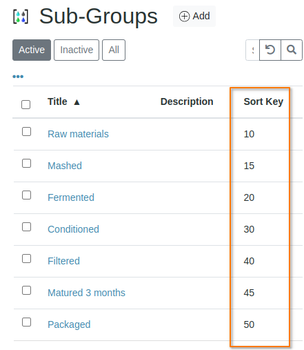
Configure the subgroups in the setup and give each a sort key - they will be sorted on the value
Assigning Samples to Sub-groups
Be sure that the Sub-group field is configured to appear on the Sample registration form. On the form select the Samples' Sub-groups
Batchbook view
For the Batch to which the Samples belong, select the Batch Book tab. This will provide a view of the Samples in the Batch in grouped and ordered per Sub-group
The Batch Book is laid out like the Results registers that were found in labs pre-digitisation. In Bika it is much neglected and the data crying out to be graphed